


Easy Antivirus - clean virus
4.21.12K Reviews
App Specs
- Version
- 1.0.4
- Updated On
- License
- Free
- Downloads
- 1,000,000+
- Developer
- TAICHI
- Categories
- Tools
- Platform
- Android
Screenshots


 Analysis by AppCompare
I approach phone-cleaning tools cautiously: a tidy screen and a reassuring “clean” message are not the same as proven protection. Easy Antivirus - clean virus is a free Android tools app from TAICHI, and its appeal is that it puts security and basic upkeep in one place. I’d treat it as a convenient helper, not a substitute for careful downloading or the protection already built into Android.
A practical baseline, not a magic fix
My most sensible routine with an app like this is to open it when I have a reason to check the phone, run a scan, and review what it reports before acting. A quick check is useful after installing something unfamiliar or when the phone starts behaving unexpectedly. If a result points to a file I recognize, I would pause and verify what it is rather than delete it simply because a tool labels it as unwanted.
That cautious approach matters because antivirus apps can only help with the threats and behaviors they can detect. A scan is a snapshot, not a guarantee that every risk has disappeared. I still avoid installing apps from sources I do not trust, check app permissions when they seem unrelated to an app’s purpose, and keep Android updated. Those habits do more for day-to-day safety than repeatedly tapping a clean-up button.
The app is rated for Everyone, so it is aimed at a broad audience rather than a specialist security workflow. Its current release is version 1.0.4, and it supports Android 7.0 or later. That makes it relevant to people using older Android phones as well as newer ones, although the experience of any security tool can depend on the device and its Android version.
Settings and decisions worth slowing down for
Before using any cleaner or protection tool, I take a moment to understand what it is asking me to do. If Easy Antivirus presents a permission request, I consider whether it makes sense for the task in front of me and whether I am comfortable granting it. I would not approve a request automatically just because the app is called an antivirus; security is a reason to be more thoughtful, not less.
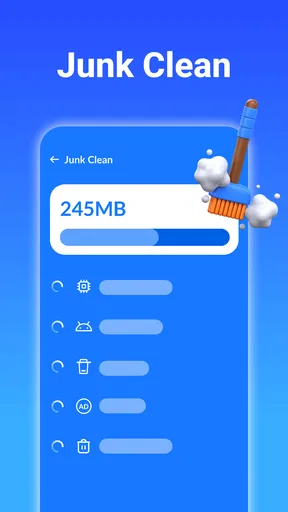
The same care applies to cleanup recommendations. Removing temporary clutter can be useful, but a broad “clean” action may not be the right choice if I have not checked what will be removed. I prefer a small, deliberate cleanup over a sweep that might discard something I wanted to keep. When space is the real problem, Android’s own storage settings can help me identify large downloads, unused apps, or media that I can review directly.
I also avoid treating battery-saving or memory-management labels as proof that a phone will run better. Closing apps or clearing data can interrupt work, remove useful local information, or simply fail to improve performance in a noticeable way. I use such tools only when there is a clear reason, and I check the result rather than repeating the action out of habit.
Worth Reading Before You Choose

EA SPORTS FC Mobile 26 Is a Bigger Football Game, but It Takes Time

Flipboard Shows What News Apps Must Do Beyond the Feed

Switching to Android Auto Means Rethinking Your Driving Routine

Google Calendar Makes a Crowded Week Easier to Manage

Ludo King Makes the Most of the Minutes Between Plans

Baby Panda World Brings Quick Play to Modern Phones, but Its Game Library Feels Busy
Faster habits for ordinary phone use
A repeatable routine is more useful than constant scanning. For example, after installing a new app, I can run a check if I am unsure about it, then review its permissions and keep an eye out for unusual behavior. If nothing seems wrong, there is little value in scanning again and again just to see the same reassuring screen. A scan is one checkpoint, not a daily ritual that replaces judgment.
Here is a realistic use case: I am traveling, have little free storage, and need to download a ticket or map. I can use a cleanup tool to look for space I can safely reclaim, but I would first check the download folder and remove only items I no longer need. I would not delete unfamiliar files simply to make the storage number look better. The useful outcome is having room for the trip, with my important documents still intact.
For a family member who does not enjoy digging through Android menus, a single place to start a scan or look for clutter may feel less intimidating. I would still show them how to read a result and when to stop before confirming a deletion. That small bit of guidance makes a simple tool more helpful and reduces the chance that a confusing warning prompts a rushed decision.
Where it fits among the alternatives
Easy Antivirus has a 4.4 average from around 12,000 ratings, with roughly 955 written reviews, and it has passed one million installs. Those figures suggest that many people have tried it, but popularity alone does not tell me how well it will suit a particular phone or what a scan can catch. I put more weight on whether the app fits my own routine and whether I can understand its recommendations.
Compared with relying only on Android’s built-in settings, a dedicated security app can feel more approachable if it gathers scanning and cleanup tasks into a clear starting point. Built-in settings are often the better choice when I want to inspect storage or manage an app directly, because they avoid adding another tool to the routine. For security, I also compare any extra app with the protection already available on the phone instead of assuming that installing more software automatically means better protection.
This is a reasonable fit for someone who wants a straightforward place to begin checking a phone and prefers uncomplicated tools. It is less suitable for someone looking for detailed threat reports, fine-grained controls, or an expert security console. If those are priorities, a security product focused on transparent explanations and configurable protection may be a better match. If the main concern is simply freeing storage, Android’s storage manager or a manual review of large files may be enough.
Limits I would keep in mind
The phrase “antivirus” can create expectations that no single app should be asked to meet. I would not use a clean scan as proof that a suspicious link, message, or download is safe, and I would not assume that a performance tool can make an older phone feel new. The strongest everyday protection still comes from cautious behavior, timely system updates, and checking what an app is asking to access.
There is also a trade-off in combining security and cleanup. One app may make common maintenance tasks easier to find, but the convenience can encourage users to grant permissions or accept recommendations without understanding them. I recommend pausing at each prompt, especially before allowing broad access or removing files. If a feature is not useful to you, leaving it alone is better than enabling it just because it appears on the main screen.
Because this is a tools app rather than a full device-management service, I would judge it by specific jobs: can I follow its scan results, can I make a cleanup decision with confidence, and does it fit without becoming another source of alerts? If the answer to those questions is no, uninstalling it and using Android’s own controls is a perfectly sensible choice. More security software is not automatically better security.
First Impressions
From the moment I launched Easy Antivirus - clean virus, the interface caught my attention. It’s sleek, user-friendly, and doesn’t bombard you with unnecessary information. Everything feels intuitive, which is a big win if you’re not exactly tech-savvy.
The installation process was a breeze. It didn’t take long, and there was no lengthy setup wizard to navigate through. Within minutes, I was ready to dive into the features.
Features That Stand Out
One of the first things I noticed was the app’s ability to perform a quick scan of my device. It’s fast and efficient, highlighting any potential threats without slowing down my phone. There’s also a deep scan option for those times when you need a more thorough check.
Another cool feature is the real-time protection. It constantly monitors your device for suspicious activity, giving you peace of mind while you browse, download, or stream. It’s like having a digital bodyguard watching your back.
I also appreciated the app’s ability to boost device performance. It clears out junk files and manages memory usage, which is perfect for freeing up space and keeping your phone running like new. Plus, the battery saver feature is a nice touch, especially if you’re always on the go.
Usability and Performance
Using Easy Antivirus - clean virus is, well, easy! The app doesn’t require any technical know-how, and the instructions are straightforward. I didn’t encounter any bugs or crashes, which is always a relief when trying out new apps.
Performance-wise, it doesn’t hog resources. My phone’s speed wasn’t affected, and I could still multitask without a hitch. This is a big plus because nobody wants an app that slows things down.
Final Thoughts
All in all, Easy Antivirus - clean virus delivers on its promises. It’s a reliable tool for keeping your device safe from unwanted threats while also enhancing performance. The app is straightforward and doesn’t try to do too much at once, which I appreciate.
If you’re looking for a hassle-free way to protect and optimize your smartphone, this app is worth considering. It’s not just about security; it’s about making sure your device runs smoothly day in and day out. So, why not give it a shot?
Pros
- User-friendly interface simplifies navigation.
- Quick scan feature saves time and resources.
- Minimal impact on device performance.
- Regular updates for new threat protection.
- Comprehensive coverage of various malware types.
Cons
- Contains ads that may interrupt usage.
- Some features require in-app purchases.
- Occasional false positives on safe apps.
- No firewall for advanced protection.
- Limited customer support options available.
FAQs for Easy Antivirus - clean virus
What features does Easy Antivirus offer?
Easy Antivirus provides users with a comprehensive suite of security tools, including real-time virus detection, malware removal, and system optimization. It also offers a privacy advisor to protect sensitive data and a Wi-Fi security check to ensure safe browsing. These features work together to keep your device secure from various threats.
How does Easy Antivirus impact device performance?
Easy Antivirus is designed to run efficiently in the background, minimizing its impact on device performance. It uses minimal resources, ensuring that your device remains fast and responsive. The app also includes a system optimization tool that helps improve overall performance by clearing unnecessary files and freeing up memory.
Is Easy Antivirus free to use?
Easy Antivirus offers a free version with basic features such as virus scanning and removal. For advanced features like real-time protection and enhanced privacy tools, a premium subscription is available. The premium version provides a more comprehensive security experience, offering additional layers of protection for your device.
Can Easy Antivirus protect against all types of threats?
While Easy Antivirus is effective against a wide range of viruses and malware, no antivirus can guarantee 100% protection against all threats. Regular updates and user vigilance are essential. Easy Antivirus updates its virus definitions regularly to protect against new threats, but users should also practice safe browsing habits.
How do I install and set up Easy Antivirus on my device?
Installing Easy Antivirus is straightforward. Simply download the app from the Google Play Store or Apple App Store, then follow the on-screen instructions to set it up. The app will guide you through the process of granting necessary permissions and running the initial scan to ensure your device is secure from the start.


